
Browser Extension
Watch meaning surface on every page you visit.
Add Cascade’s free browser extension to Chrome. It reshapes text on any page you visit, making the structure of each sentence visible so meaning is easier to reach. Grounded in four decades of language science.




How It Works
What Cascade actually does to a page
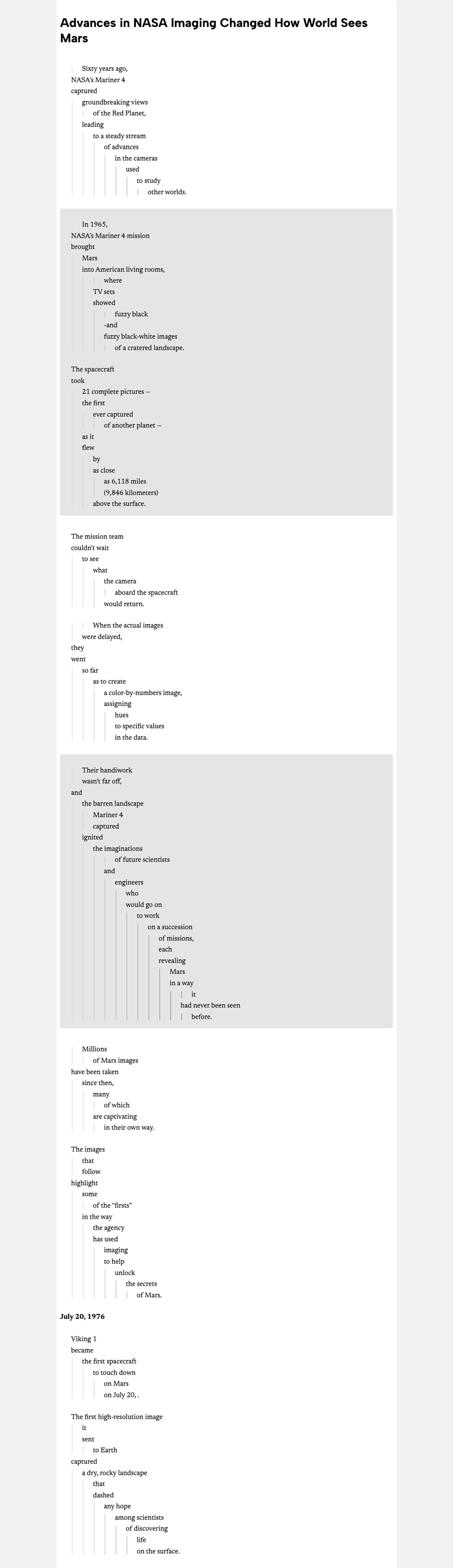
Cascade doesn’t change the words on a page. It reshapes each sentence to make the key actions and relationships easier to grasp. The text works with the way we naturally process language. Reading gets easier. Meaning follows.
Works everywhere you read
Any site. No copy-pasting.
Cascade runs on the pages you’re already reading — news, blogs, documentation — reshaping the text to make structure visible and meaning easier to ascertain.

More Ways to Read
Make it work the way you read
Hands-Free
AutoScroll
Let Cascade scroll for you, moving through reshaped text at a steady, comfortable pace.
Your Choice
Page Images
Keep page images in view, or hide them to focus purely on text.
Full Page or Selection
Cascade What You Choose
Reshape the entire page automatically, or select just the passage you want.
Display Options
Styles to Match Your Eyes
Switch between dark mode, bold text, and other display styles.
Leading a team?
From a reader
As someone with ADHD and a mild reading disability, I found it easier to follow along with the passage to catch the point.
Adult Reader

Add Cascade to your browser.
Every page you read gets a little clearer, the moment you add it. Free, and ready in a couple of clicks.
Good to know
Common questions
What does the extension do?
Cascade reshapes the text on any page you’re reading — aligning subjects and verbs, indenting clauses and phrases underneath — so the structure of each sentence is easier to see. The words don’t change; how they’re arranged does. Want to see it first? Paste your own text into See Cascade and watch it reshape in real time.
Is it free?
Yes. Free to add and free to use, available now for Chrome.
How do I get started?
Add it from the Chrome Web Store and create a free Cascade Reading account — an account is required before you can convert pages. A Welcome Guide walks you through your reading preferences. After that, any page converts with one click.
What does the extension see, and what data do you collect?
Cascade works only with the text already visible on the page you’re viewing. It doesn’t read what you type into forms or password fields. We collect only what’s needed to run the extension: your account email and basic usage data. We don’t sell your data. Full detail is in our Privacy Policy.
Will it slow down the pages I visit?
No. Cascade reshapes text after a page finishes loading, the same way a reader-mode or ad-blocker extension works — and you can turn it on or off for any page in one click.
Does it work on every site?
It works on most text-heavy pages — articles, documentation, email, and long-form reading. Some highly interactive, app-like sites aren’t supported yet.
Can students use it?
Yes. The extension is free for any individual, so students can use it for homework and personal reading whether or not their school has adopted Cascade. If you’re a teacher, start on our For Educators page.
Can my company use this at scale?
The extension is free for individuals. If you want to make Cascade part of your product’s default experience — a browser, a reading app, anything shipped to your own users — that’s a license, not a download. Get in touch.